One IP or a whole list
Paste a list or import a file. The app validates inputs, retrieves IP information and suggests a decision for each row. You can edit it before registration.
SOC IP Manager · Built for a security organization
The app checks IPs in batches, retrieves reports and suggests durations using your rules. These repetitive steps are automated; records, tickets, history, review dates and Excel exports are available in the same app.
Actual application screens with demonstration data, without organizational records.
Where it started
Every IP has a reason for investigation, a ticket, a duration and a review date. When these are spread across files, finding history and tracking dates becomes repetitive work.
The app retrieves IP information in batches, suggests decisions using rules and tracks records through review and release confirmation. Editable decisions and history stay with the record.
From intake to reports
Open any section to view its image.
Paste a list or import a file. The app validates inputs, retrieves IP information and suggests a decision for each row. You can edit it before registration.
See the abuse score, report counts, last report and network information together. Retrieved AbuseIPDB report details can also be viewed and copied.
Define rules for country, score, usage type or other conditions: a duration, skip registration or require a manual decision. You control order and exceptions.
Search by IP, ticket or scenario. See status, duration, registration and review dates together, then open details and history.
For example, find blocked records with a specific scenario. Select fields, operators and values, and narrow by country, score or date range.
Due records are collected in the review queue. Check fresh information and extend the duration or queue the record for release. Final confirmation is a separate step.
If you only need to investigate a list, retrieve its information and export to Excel. Results, retrieved reports and errors are included.
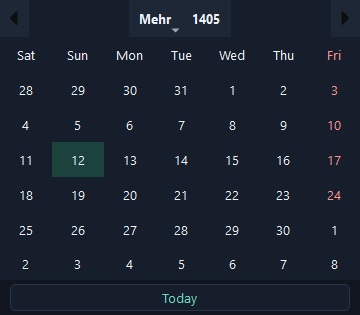
Choose the Jalali or Gregorian calendar for date ranges and review dates. Filtered records can also be exported.
Automated lookups
Batch lookup and rule-based duration suggestions replace repeating the same steps for each row.
Editable decisions
Edit each row’s country and duration, and define exceptions or require manual decisions.
Visible follow-up
Extension, pending release and final confirmation have explicit states. This app manages records and workflow; it doesn’t enforce firewall blocks.
| Task | Manual tracking | With SOC IP Manager |
|---|---|---|
| List input | Enter and check one by one | Batch preview and lookup with invalid and duplicate checks |
| Duration | Recheck criteria for every IP | Rule-based suggestions with manual overrides |
| History | Search through files and tickets | Find records and history in one app |
| Review dates | Track dates separately | Dedicated due and pending queues |
| Reporting | Collect information and build files manually | Excel from lookups or filtered records |
Start with the tasks repeated every day and bring checking, organisation, follow-up and reporting into one workflow.
Inside SOC IP Manager
Paste a list or import a file. The app validates inputs, retrieves IP information and suggests a decision for each row. You can edit it before registration.
Actual application render in an isolated test workspace; demonstration data, not organizational records. Identifiers are obscured.Open the full-size image ↗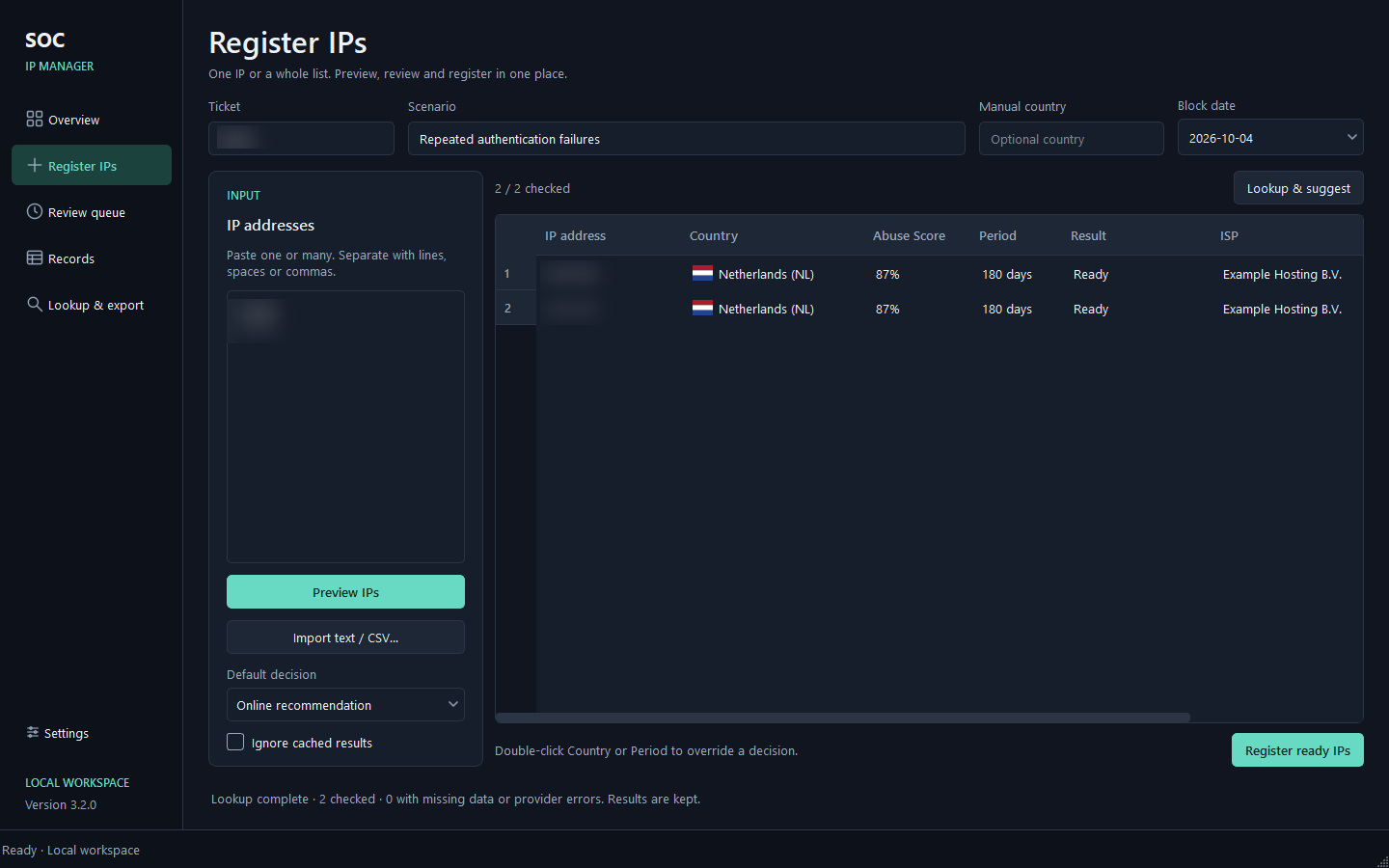
Inside SOC IP Manager
See the abuse score, report counts, last report and network information together. Retrieved AbuseIPDB report details can also be viewed and copied.
Actual application render in an isolated test workspace; demonstration data, not organizational records. Identifiers are obscured.Open the full-size image ↗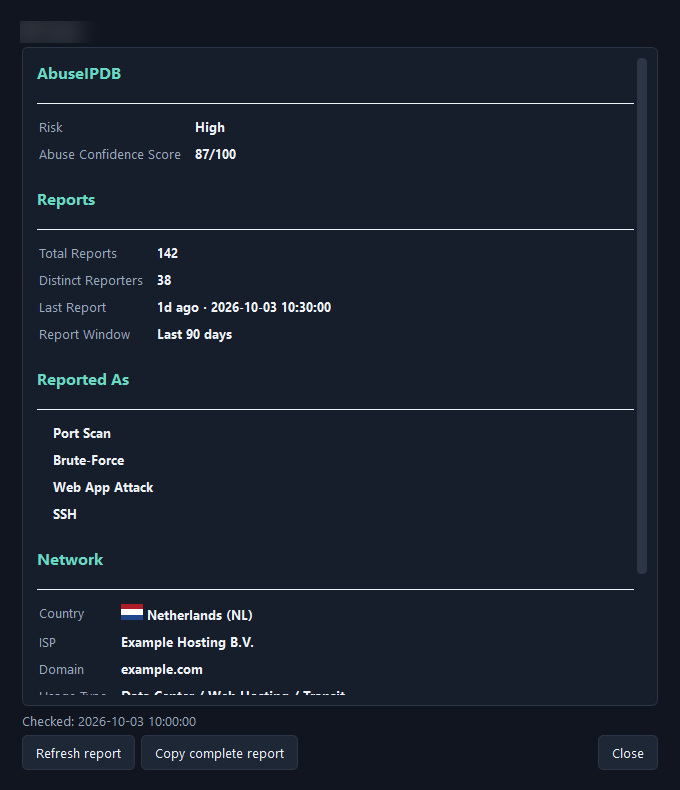
Inside SOC IP Manager
Define rules for country, score, usage type or other conditions: a duration, skip registration or require a manual decision. You control order and exceptions.
Actual application render in an isolated test workspace; demonstration data, not organizational records. Identifiers are obscured.Open the full-size image ↗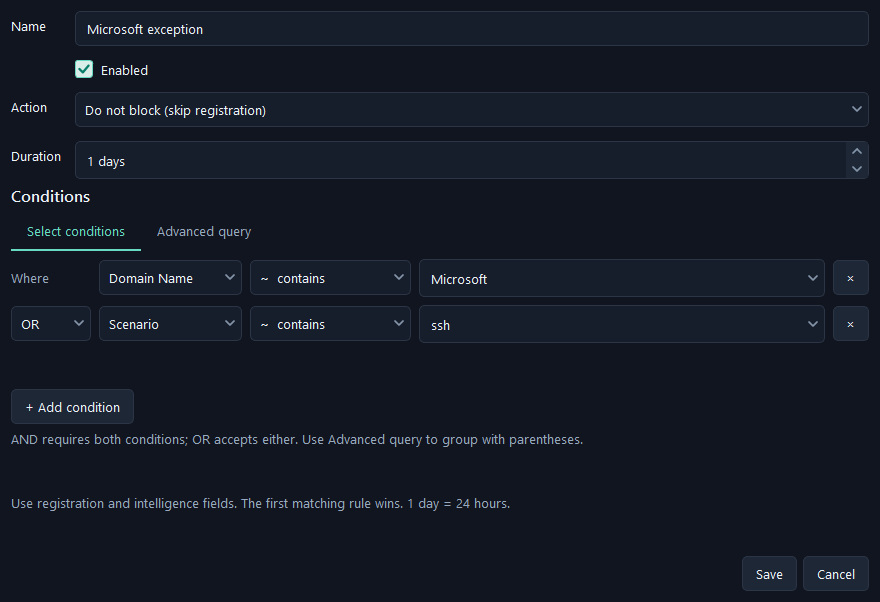
Inside SOC IP Manager
Search by IP, ticket or scenario. See status, duration, registration and review dates together, then open details and history.
Actual application render in an isolated test workspace; demonstration data, not organizational records. Identifiers are obscured.Open the full-size image ↗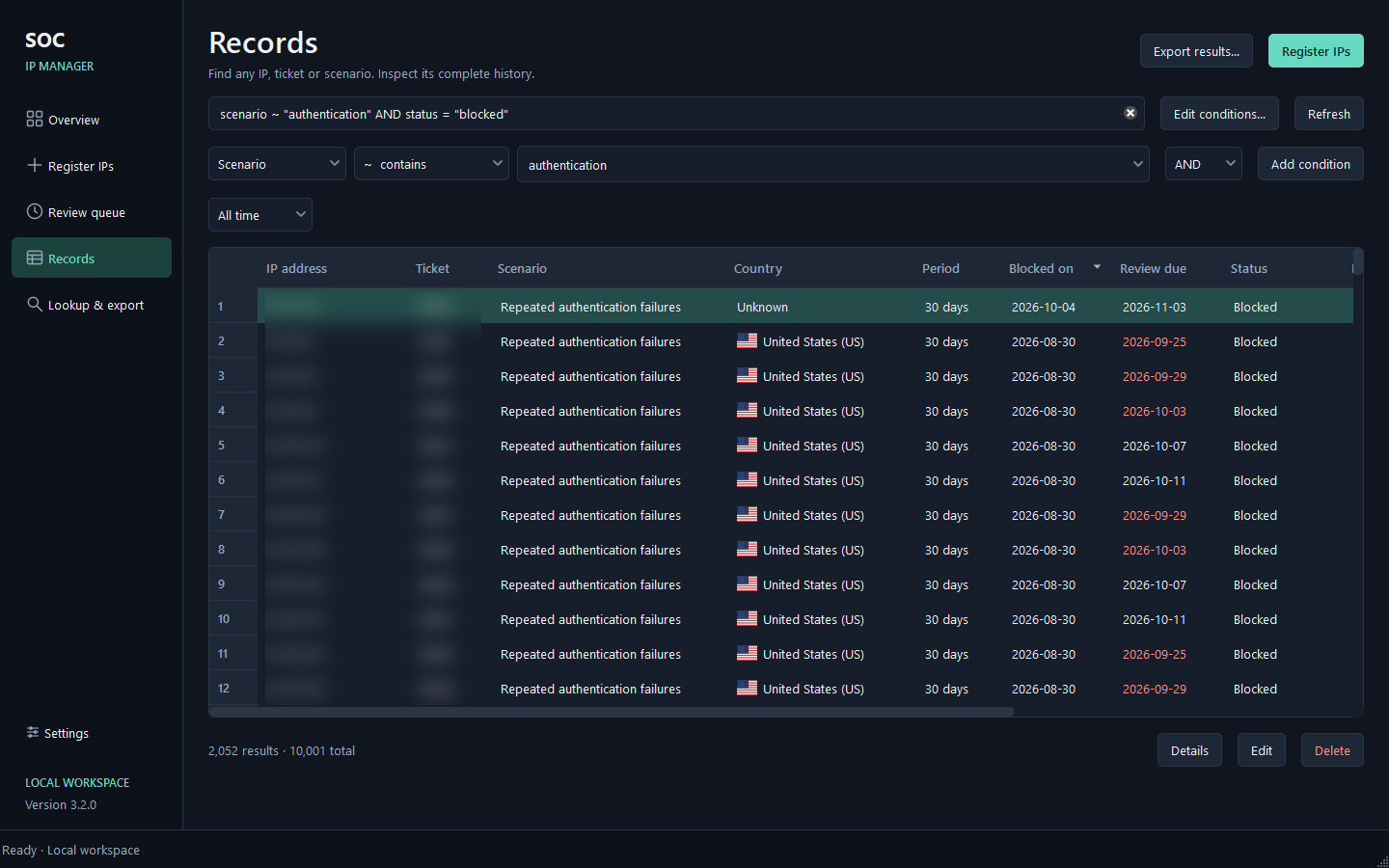
Inside SOC IP Manager
For example, find blocked records with a specific scenario. Select fields, operators and values, and narrow by country, score or date range.
Actual application render in an isolated test workspace; demonstration data, not organizational records. Identifiers are obscured.Open the full-size image ↗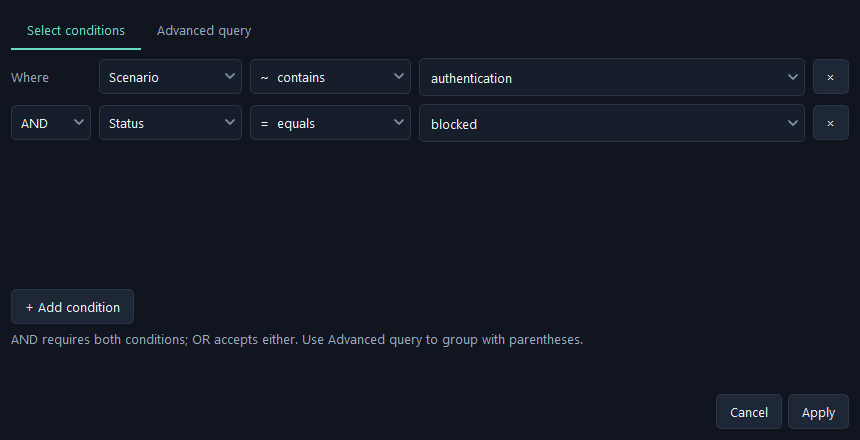
Inside SOC IP Manager
Due records are collected in the review queue. Check fresh information and extend the duration or queue the record for release. Final confirmation is a separate step.
Actual application render in an isolated test workspace; demonstration data, not organizational records. Identifiers are obscured.Open the full-size image ↗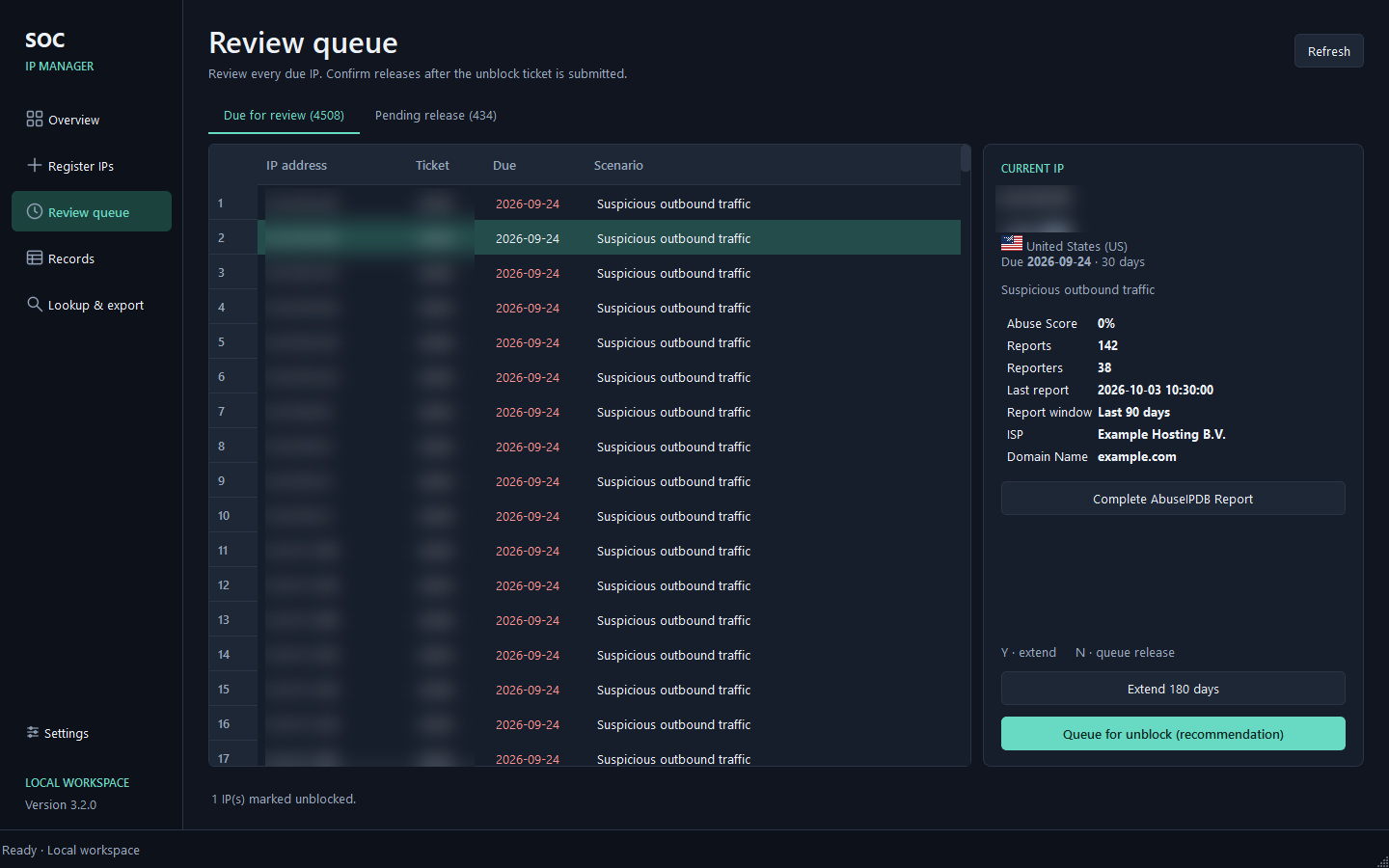
Inside SOC IP Manager
If you only need to investigate a list, retrieve its information and export to Excel. Results, retrieved reports and errors are included.
Actual application render in an isolated test workspace; demonstration data, not organizational records. Identifiers are obscured.Open the full-size image ↗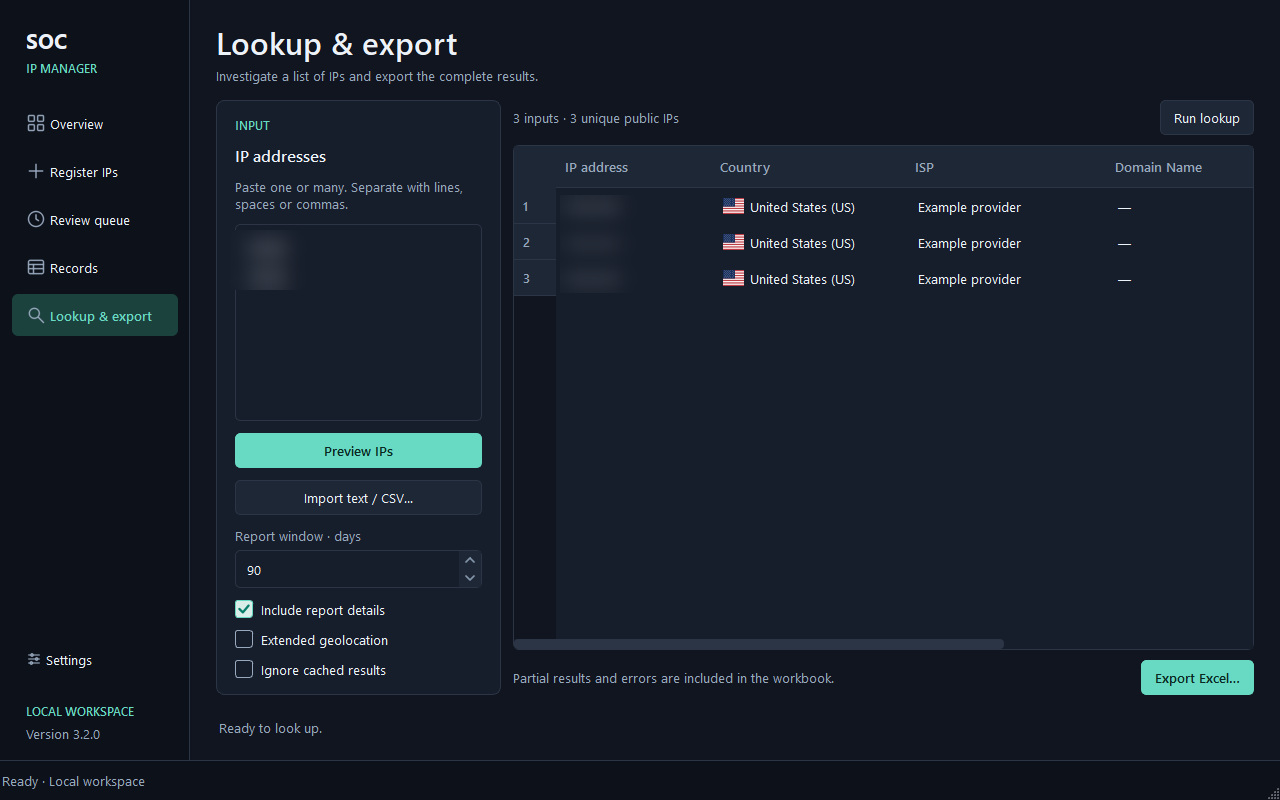
Inside SOC IP Manager
Choose the Jalali or Gregorian calendar for date ranges and review dates. Filtered records can also be exported.
Actual application render in an isolated test workspace; demonstration data, not organizational records. Identifiers are obscured.Open the full-size image ↗